Live-sound feedback suppression

Stop the howl.
Keep your hands on it.

AeroNotch finds feedback in a fraction of a second and cuts it with notches narrower than a semitone, with zero added latency. Every notch has a fader, so the engineer always has the final say.

Beta 1.0.0-beta.1 0 samples latency 16 notch filters 1/48-octave notches Runs on the computer you already own
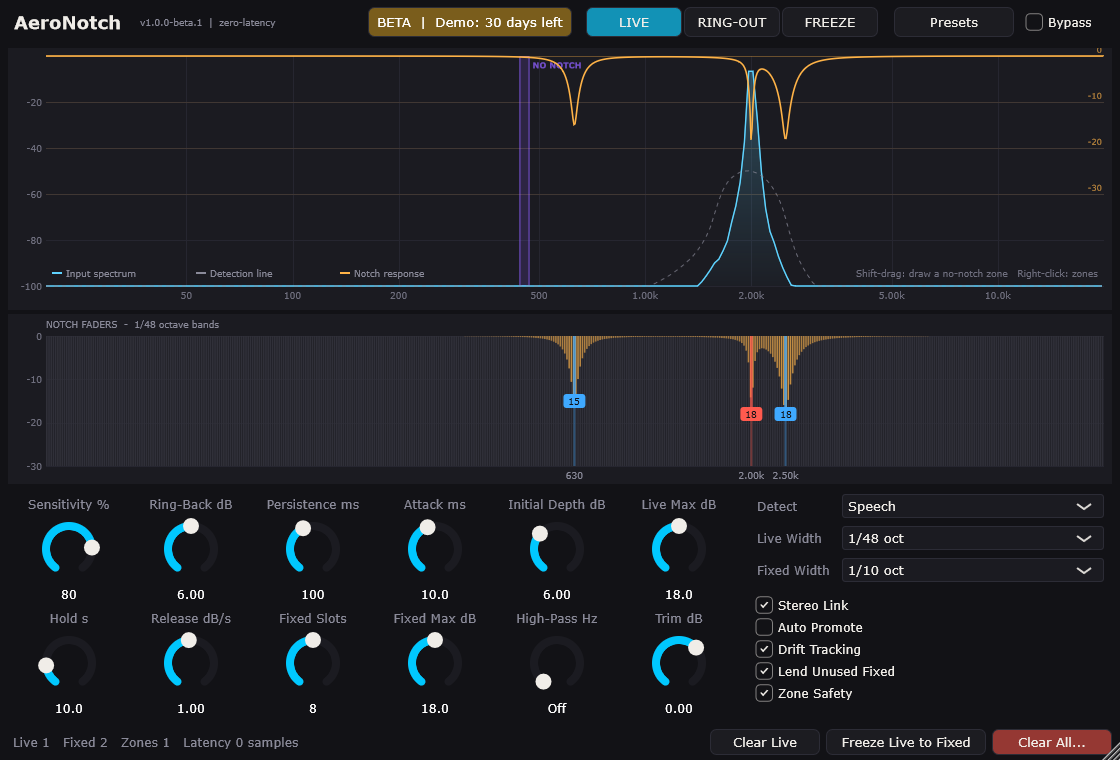
The AeroNotch window: a real-time spectrum with the notch response drawn on top, notch faders below, and the controls.
A 2 kHz howl caught live (red), two ring-out notches locked in (blue), and a no-notch zone protecting 440-470 Hz (purple).

How it works

Ring out the room. Then let it track the show.

The way hardware feedback suppressors have always been used: fixed notches for the room, live notches for the performance.

Ring-out before the show

Switch to RING-OUT and raise the gain slowly. Each frequency that starts to ring is locked into the fixed pool. Save it as a venue preset for next time.

Live tracking during the show

In LIVE mode the fixed notches stay put, and live notches catch whatever the performers' movement causes. They hold, then ease off slowly, testing the water.

Your hands on every notch

Lift a notch with its fader or the arrow keys. If the frequency rings again, AeroNotch pulls it straight back down: a friendly tug-of-war where the room keeps the last word.

Catching feedback Holding Easing off Fixed (ring-out)

Features

Precise where it cuts, transparent everywhere else

0

Zero added latency

Detection runs on a copy of the signal. The notches are filters with no buffering, so the plugin adds 0 samples. Bypass and trim are click-free.

48

Narrow enough to leave the voice alone

Live notches default to 1/48 octave (about 14 Hz wide at 1 kHz), adjustable down to 1/80. The filters run in double precision and land within a fraction of a hertz of the howl.

16

16 notches, two pools

8 fixed for the room and 8 live for the show by default, adjustable. Fixed slots you haven't used lend themselves to live tracking.

⚙

No-notch zones

Shift-drag across the analyser to protect a held note or an instrument's range. A safety override still catches a real runaway howl inside a zone, shallowly.

🔒

The Lock badge

A frequency you keep lifting and the room keeps pulling back gets a LOCK badge. One click makes it a fixed notch.

⇆

Linked stereo

Left and right always get identical filters, so the notches can never shift the image or cancel in mono.

☰

See exactly what it is doing

A real-time spectrum with the detection line and the exact response of the running filters, plus a 1/48-octave band strip under it.

💾

Venue presets

Save the settings, the ring-out and the zones together, and start next week in the same room where you left off. Plain-text files you can back up.

⌨

Keyboard control

Click a notch, then ← → to select, ↑ ↓ to ease off or deepen, L to lock.
Specs

Light enough for the rig you already have

No dedicated hardware box and no special host. AeroNotch is a plugin and a standalone app.

Plugin latency0 samples
Notch filters16 (fixed + live pools), double-precision biquads
Notch width1/5 to 1/80 octave; live default 1/48 (Q 69), fixed default 1/10
Detection accuracyWithin 0.01 Hz of a steady tone in the test suite, at 44.1 to 192 kHz
CPUAbout 1.3 % of one core per mono instance with all 16 notches active (measured at 48 kHz; varies by computer)
MemoryUnder 1 MB per instance. No GPU needed.
Formats, betaWindows: VST3 and Standalone (validated with Steinberg's VST3 validator)
Formats, in testingmacOS: VST3, AU, Standalone · Linux: VST3, LV2, Standalone
HostsAny VST3 host. Built for live hosts such as Waves SuperRack Performer, Gig Performer and LiveVST; on Linux, Carla, Element or Ardour.
LicensingNo time limit in beta.1. From a later beta: a 30-day full demo. A licence is a small signed file, not tied to one computer. An unlicensed copy after the demo passes audio through untouched: it never mutes your system.

Beta

Help shape AeroNotch

The beta is fully working, with no time limit in beta.1. Download the Windows VST3 or Standalone from GitHub, put it on your rig, and tell us how your room behaved.